

Semantic Kernel Explained: How Your Code and AI Models Work Together
IT World · AI & .NETIf you have ever tried to add AI to a real application, you probably started the same way I did. You sent a prompt to a model, got a nice answer back, and felt great for about ten minutes. Then the real questions showed up. How do I let the model read my orders? How do I stop it from guessing? How do I keep my prompts out of twenty different files? And what happens when I want to switch from one model to another?
Semantic Kernel is Microsoft's answer to those questions. In this article I will explain what it is, why it exists, how its pieces fit together, and how the orchestration layer decides which of your plugins to call. We will finish with a small working example you can adapt for your own project.
What is Semantic Kernel?
Semantic Kernel (often shortened to SK) is an open-source SDK from Microsoft that helps you build AI applications and agents in C#, Python and Java. It sits between your application and the AI model. Your code talks to the kernel, and the kernel talks to the model, to your own functions and to your data.
A simple way to picture it: the AI model is a very clever person who has read half the internet but has never seen your company systems. Semantic Kernel is the assistant standing next to that person. It hands over your question, explains which tools are available in the office, runs those tools when the person asks, and brings back the results.
Good to know: the name sounds academic, but there is nothing mysterious in it. "Semantic" refers to working with meaning through natural language, and "kernel" is the central object that holds everything together.
Why does it exist? The purpose
You can call Azure OpenAI directly with an HTTP client, and for a single prompt that is perfectly fine. The trouble starts when the application grows. Semantic Kernel exists to take care of the repetitive and error-prone parts so you can focus on what your product should do.
- One way to talk to many models. You write against a common interface, so moving from one model or provider to another is a configuration change, not a rewrite.
- Letting AI use your code. You expose normal methods as plugins, and the model can ask for them when it needs real data or has to take an action.
- Reusable prompts. Prompt templates with variables live in one place, can be versioned, and are easy to test.
- Memory and grounding. You can connect vector stores so the model answers from your documents instead of from guesses.
- Control and safety. Filters let you log, approve, redact or block what goes in and out.
- Production habits. It fits into dependency injection, logging and telemetry that .NET developers already use.
The big picture: architecture
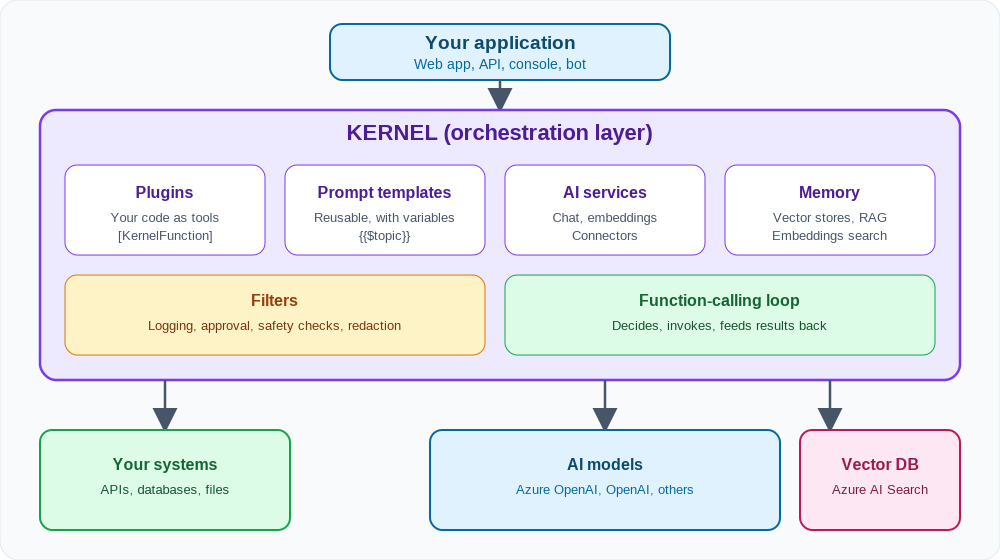
Before we go piece by piece, here is the whole structure on one page. Your application only talks to the kernel. The kernel owns the plugins, the prompt templates, the AI services and the memory connectors, and it runs a loop that lets the model use those tools.
The main components, one by one
1. The Kernel
The Kernel object is the container and the coordinator. It holds the list of plugins, the registered AI services, the filters and the settings. In a .NET app you normally create it once through a builder or register it with dependency injection, then reuse it.
2. AI services and connectors
A connector is the piece that knows how to speak to a specific provider. There are connectors for chat completion, text embeddings and more, for Azure OpenAI, OpenAI and several other providers. Your code asks for IChatCompletionService, and the connector deals with endpoints, keys and request formats behind the scenes.
3. Plugins and functions
A plugin is a group of related functions. A function is one action, such as "get order status" or "send email". Functions can be written in C# (native functions) or defined as prompts (semantic functions). Each function carries a name and a description. The description is what the model reads, so it matters a lot. We will come back to this in the plugin section.
4. Prompt templates
A prompt template is a prompt with placeholders, for example Summarise this text in {{$style}} style: {{$input}}. Templates keep instructions out of your business code and let you reuse them across features. SK supports its own template syntax and also Handlebars and Liquid.
5. Memory and vector stores
Models do not know your private documents. To fix that, you turn your text into embeddings (lists of numbers that capture meaning), store them in a vector database such as Azure AI Search, and look up the closest matches at question time. The results are added to the prompt. This pattern is known as retrieval-augmented generation, or RAG.
6. Filters
Filters are hooks that run before and after a function call or a prompt render. They are the right place for logging, permission checks, human approval and removal of sensitive data. If you have used middleware in ASP.NET Core, the idea will feel familiar.
7. Chat history
The ChatHistory object stores the conversation so far, including user messages, assistant replies and tool results. The model has no memory between calls, so you send the relevant history each time.
How it works: the orchestration layer
Orchestration is simply the job of deciding what happens next. When a user asks a question, someone has to decide whether the model can answer directly, whether a function must run first, and what to do with the result. In Semantic Kernel, the kernel and its function-calling loop do this work.
Here is the idea in plain words. You give the model your question and a list of tools. The model replies with either a final answer or a request such as "please run get_order_status with order 1001". The kernel runs that function, adds the result to the conversation, and asks the model again. This repeats until the model has enough to give a final answer.
Key point: the model never runs your code. It only asks. The kernel, which lives in your application, decides whether and how the function actually runs. That is what keeps you in control.
How the orchestration layer manages plugins
This is the part people find most puzzling, so let us slow down. How does a model "know" about a C# method? It does not. What it sees is a text description of the method, and the kernel does all of the translating.
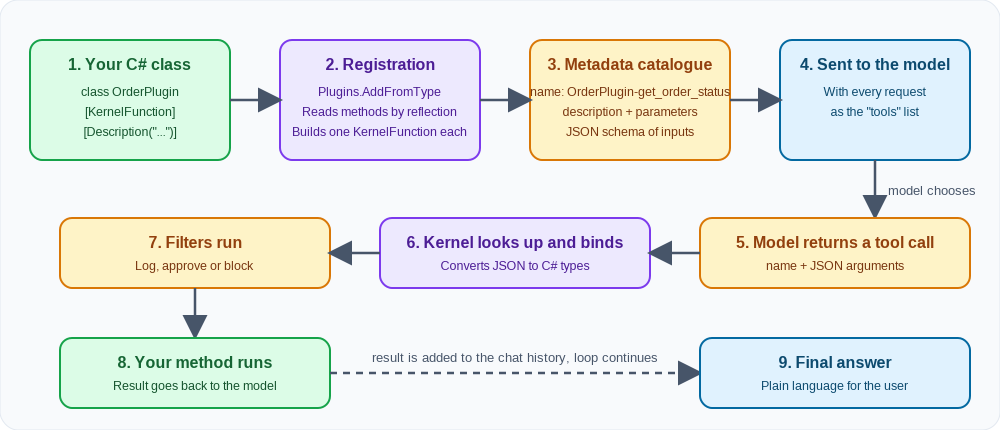
- You write a normal class. Methods you want to expose are marked with
[KernelFunction]and described with[Description]. - You register the class. Calling
Plugins.AddFromType<T>()makes the kernel read the methods using reflection and create one function object for each. - The kernel builds a catalogue. For each function it stores the name, the description and a JSON schema of the parameters.
- The catalogue is sent with each request. The model receives it as its list of available tools.
- The model picks a tool. It returns the function name and the arguments as JSON.
- The kernel finds and binds. It looks the function up by name and converts the JSON arguments into real C# types.
- Filters run. This is where you can log, ask for approval or reject the call.
- Your method executes. The return value is added to the chat history, and the loop continues until the model writes its final reply.
Why the descriptions matter so much
The model chooses a tool using only its name, its description and its parameter names. If your description says "does order stuff", the model will guess. If it says "Gets the shipping status and expected delivery date for one order. Use when the user gives an order number", it will choose correctly far more often. I would treat descriptions like documentation for a new colleague who cannot ask any questions.
Automatic or manual invocation
With FunctionChoiceBehavior.Auto() the kernel runs the whole loop for you, which is the easiest way to start. If you want to inspect every call yourself, for example for approvals, you can choose manual invocation and handle each tool call in your own code. You can also require a specific function or turn tool use off for a given request.
The whole flow, from question to answer
Now let us put every piece together and follow one user question from start to finish. The example is the same order assistant that I used in my MCP server guide: a customer asks where their order is.
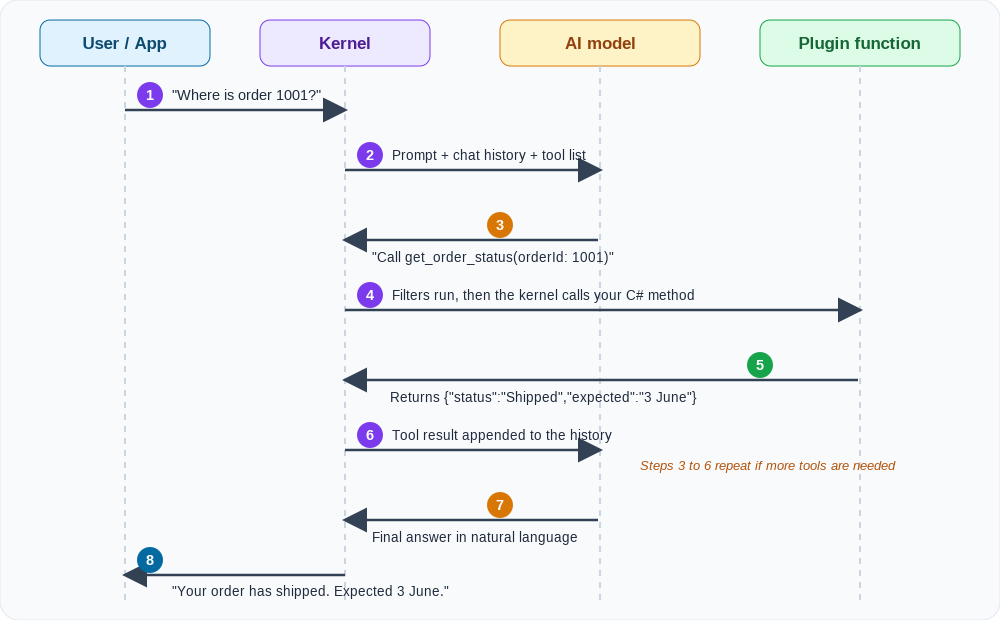
- The user types, "Where is order 1001?"
- Your app adds the message to the chat history and calls the kernel. The kernel sends the history and the tool catalogue to the model.
- The model decides it needs data and replies with a tool call:
get_order_statuswithorderId = 1001. - The kernel runs its filters, then calls your C# method.
- Your method reads the order from your database or API and returns the result.
- The kernel adds that result to the history.
- The kernel asks the model again. This time the model has what it needs and writes a normal answer.
- Your app shows the reply: "Your order has shipped and should arrive on 3 June."
If the question had been "Compare orders 1001 and 1002", the model could ask for two calls in the same turn or in two turns. The loop handles both without any extra code from you.
How Semantic Kernel connects to the AI model and Azure OpenAI
The connection is made through a chat completion service. You register it once when you build the kernel, and everything else uses it through the common interface.
For Azure OpenAI you need three values: the endpoint of your Azure OpenAI resource, the deployment name of the model you created (this is your own label, not necessarily the model name), and a credential. An API key works for quick experiments. For production, use Microsoft Entra ID with a managed identity so there is no secret to leak.
Behind the scenes the connector turns your chat history and tool catalogue into the request format that Azure OpenAI expects, sends it, and converts the answer back into types that SK understands. That is why your own code does not change if you later switch to another provider that has a connector.
Note: your deployed model must support tool or function calling for automatic invocation to work. Newer chat models do. If something does not behave as expected, check the model and API version first.
A working example in C#
Create a console project and add the package with dotnet add package Microsoft.SemanticKernel. Then start with the plugin, which is just a class with one method.
using System.ComponentModel;
using Microsoft.SemanticKernel;

public class OrderPlugin
{
	private static readonly Dictionary<int, (string Status, string Expected)> Orders = new()
	{
		[1001] = ("Shipped", "3 June 2026"),
		[1002] = ("Processing", "5 June 2026")
	};

	[KernelFunction("get_order_status")]
	[Description("Gets the shipping status and expected date of one order. Use when the user gives an order number.")]
	public string GetOrderStatus([Description("The numeric order id, for example 1001")] int orderId)
	{
		return Orders.TryGetValue(orderId, out var o)
			? $"Order {orderId}: {o.Status}, expected {o.Expected}"
			: $"Order {orderId} was not found.";
	}
}
Now build the kernel, register the Azure OpenAI service and the plugin, and let the model use it.
using Microsoft.SemanticKernel;
using Microsoft.SemanticKernel.ChatCompletion;
using Microsoft.SemanticKernel.Connectors.OpenAI;

var builder = Kernel.CreateBuilder();

builder.AddAzureOpenAIChatCompletion(
	deploymentName: "gpt-4o",
	endpoint: Environment.GetEnvironmentVariable("AZURE_OPENAI_ENDPOINT")!,
	apiKey: Environment.GetEnvironmentVariable("AZURE_OPENAI_KEY")!);

builder.Plugins.AddFromType<OrderPlugin>();

var kernel = builder.Build();
var chat = kernel.GetRequiredService<IChatCompletionService>();

var settings = new OpenAIPromptExecutionSettings
{
	FunctionChoiceBehavior = FunctionChoiceBehavior.Auto()
};

var history = new ChatHistory("You are an order assistant. Use the tools. Never guess order data.");
history.AddUserMessage("Where is order 1001?");

var reply = await chat.GetChatMessageContentAsync(history, settings, kernel);
Console.WriteLine(reply.Content);
Run it and you should see something like "Order 1001 has shipped and is expected on 3 June 2026." The kernel found the plugin, the model asked for it, your method ran, and the answer came back in plain language, all from about twenty lines of setup.
The same thing as pseudo code
If you prefer to see the logic without the syntax, this is what the kernel does for you inside that single call:
messages = history
tools    = describe(all registered plugin functions)

loop (up to a safe limit):
	response = model.chat(messages, tools)

	if response has a final text answer:
		return response.text

	for each toolCall in response.toolCalls:
		run filters(toolCall)
		result = invoke(plugin.function, toolCall.arguments)
		messages.add(toolResult(toolCall.id, result))
Seeing it written out like this removes a lot of the magic. It is a loop, a catalogue and a lookup. Everything else is good engineering around those three ideas.
Prompt templates in practice
Plugins are not only for C# code. You can also create a function from a prompt, and the kernel will treat it like any other function.
var summarise = kernel.CreateFunctionFromPrompt(
	"Summarise the text below in {{$style}} style, in at most three sentences.\n\n{{$input}}");

var result = await kernel.InvokeAsync(summarise, new()
{
	["style"] = "friendly",
	["input"] = longArticleText
});

Console.WriteLine(result);
This is handy for tasks like summarising, rewriting or classifying text, where you want the same instruction applied every time and want to change it in one place.
Adding a filter for safety and logging
Suppose some functions should never run without a record of who asked for them. A function invocation filter wraps every call.
public class AuditFilter : IFunctionInvocationFilter
{
	public async Task OnFunctionInvocationAsync(
		FunctionInvocationContext context,
		Func<FunctionInvocationContext, Task> next)
	{
		Console.WriteLine($"Calling {context.Function.PluginName}.{context.Function.Name}");
		await next(context);
		Console.WriteLine("Finished with a result.");
	}
}

builder.Services.AddSingleton<IFunctionInvocationFilter, AuditFilter>();
In a real system you would write to your logging pipeline, check the signed-in user's permissions, or stop the call and ask a person to approve it. Anything that changes data, such as cancelling an order, deserves that extra step.
Other important topics worth knowing
Planning and agents
Early versions of SK had separate "planners" that wrote a multi-step plan before running it. Today, function calling does most of that work, because modern models can chain tools by themselves. On top of that, SK offers an agent framework where an agent has its own instructions, tools and conversation thread, and several agents can work together on one task.
Retrieval-augmented generation
For question answering over your own documents, the usual recipe is: split the documents, create embeddings, store them in a vector database, search for the closest chunks when a question arrives, and add those chunks to the prompt. Semantic Kernel provides abstractions for vector stores so the code stays tidy.
Observability
SK emits logs, metrics and traces that work with OpenTelemetry. Track token usage, latency and failed tool calls from day one. AI features can get expensive quietly, and without numbers you will not notice until the invoice arrives.
Semantic Kernel and MCP
The Model Context Protocol is a standard way for tools to be published by a server and used by any compatible client. Semantic Kernel can use MCP tools as plugins, which means a tool you build once can serve several applications. If this sounds interesting, read how to build an MCP server with Python and .NET.
Where Semantic Kernel fits in the Microsoft AI picture
Microsoft's AI tooling is changing quickly, and newer agent-focused libraries are appearing alongside SK. Before you start a long project, check the official Semantic Kernel and Microsoft Agent Framework pages to confirm the recommended path for your use case. The core ideas in this article, which are tools, prompts, memory and an orchestration loop, carry over either way.
Common mistakes and how to avoid them
- Vague descriptions. If the model keeps choosing the wrong tool, improve the description before changing anything else.
- Too many tools at once. Dozens of functions in one request confuse the model and cost tokens. Group them and expose only what is relevant to the task.
- Returning huge results. Send back short, clean data. A whole database row set will waste the context window.
- Skipping approval for risky actions. Reading is low risk. Deleting, paying or emailing needs a filter or a human check.
- Putting keys in code. Use environment variables, Key Vault or managed identity.
- Trusting the output blindly. Validate arguments in your methods. The model is clever, but it can still send a negative order number.
- No testing. Keep a small set of real questions and run them after every prompt or description change.
When should you use Semantic Kernel?
It is a good fit when you are building in .NET, Python or Java, you want AI to call your own business logic, you may change model providers later, and you value structure such as filters, dependency injection and telemetry. For a one-off script that sends a single prompt, the plain Azure OpenAI client is simpler and perfectly fine. Choose the tool that matches the size of the problem.
Summary
Semantic Kernel gives you a tidy way to connect an AI model to your own code and data. The kernel holds your plugins, prompts, services and memory. The orchestration layer sends the model a catalogue of tools, runs the ones it asks for, feeds the results back, and repeats until there is a final answer. Your descriptions guide the model, filters keep you safe, and connectors keep you from being tied to one provider.
My advice is to start small. Build one plugin with one well-described function, test it with five real questions, and only then grow. If you are working with Sitecore or other enterprise platforms, Sitecore with AI shows how similar ideas appear there, and what programming really is is a friendly refresher if you are helping a beginner follow along.