

Building an MCP Server: From a .NET API to Azure AI Foundry
IT World · AI & CloudWhat is MCP, in plain words
MCP stands for Model Context Protocol. Think of it as a USB port for AI. A model by itself only knows what it was trained on. It cannot check your orders, read your database or call your company API. MCP gives it a standard way to do that.
An MCP server publishes a list of tools. Each tool has a name, a short description and some inputs. The AI reads that list, decides which tool helps the user, calls it, and uses the result to write a reply.
The three words you will see everywhere
- Host or client: the app that talks to the model, such as an Azure AI Foundry agent.
- Server: the program that exposes tools. This is what we build.
- Tool: one action the AI may perform, for example
get_order_status.
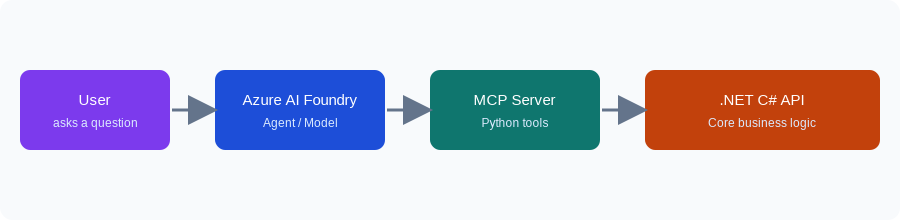
Image could not be loaded.
Why wrap an existing API?
Most teams already have working business logic behind REST endpoints. Rewriting it for AI is a waste. Instead, we keep the logic in .NET and build a thin MCP layer on top. The tools are only wrappers: they receive the model's request, call the API, and return the answer.
This keeps things clean. Your C# team owns the rules, security and data. The MCP layer owns only one job, which is describing the API in a way an AI understands.
The plan
Our small example is an order status service. A user asks, "Where is my order 1001?" and the AI answers using real data. Here is the journey of that question.
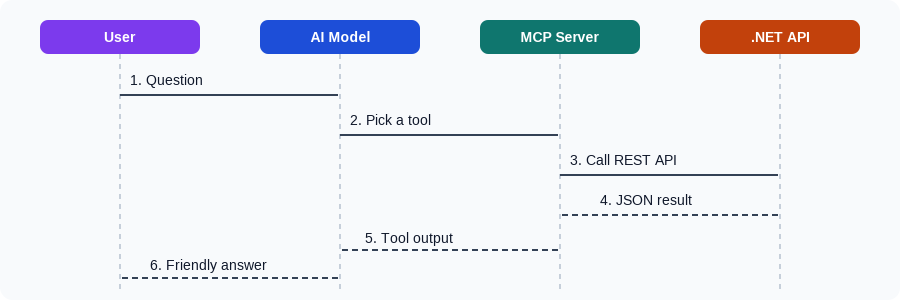
Image could not be loaded.
Step 1: The .NET C# API
Create a minimal API. It has two endpoints: one to fetch an order and one to list orders for a customer. Run dotnet new web -n OrderApi and replace Program.cs with this.
OrderApi/Program.cs
var builder = WebApplication.CreateBuilder(args);
var app = builder.Build();

var orders = new List<Order>
{
    new(1001, "C-1", "Shipped", new DateTime(2026, 6, 3)),
    new(1002, "C-1", "Processing", new DateTime(2026, 6, 5)),
    new(1003, "C-2", "Delivered", new DateTime(2026, 5, 28))
};

app.MapGet("/api/orders/{id:int}", (int id) =>
{
    var order = orders.FirstOrDefault(o => o.Id == id);
    return order is null
        ? Results.NotFound(new { message = $"Order {id} was not found." })
        : Results.Ok(order);
});

app.MapGet("/api/customers/{customerId}/orders", (string customerId) =>
    Results.Ok(orders.Where(o => o.CustomerId == customerId)));

app.Run();

record Order(int Id, string CustomerId, string Status, DateTime ExpectedDate);
Run it with dotnet run and open /api/orders/1001. You should see:
{"id":1001,"customerId":"C-1","status":"Shipped","expectedDate":"2026-06-03T00:00:00"}Step 2: The Python MCP server
Now the wrapper. We use the official Python MCP SDK and its FastMCP helper, plus httpx to call our API.
python -m venv .venv
.venv\Scripts\activate
pip install "mcp[cli]" httpx
Create server.py. Pay attention to the docstrings. The AI reads them to decide when to use each tool, so write them like instructions to a teammate.
server.py
import os
import httpx
from mcp.server.fastmcp import FastMCP

API_BASE = os.getenv("ORDER_API_BASE", "http://localhost:5000")
mcp = FastMCP("order-tools", host="0.0.0.0", port=8000)


async def call_api(path: str) -> dict:
    """Call the .NET API and always return a safe dictionary."""
    try:
        async with httpx.AsyncClient(timeout=10) as client:
            response = await client.get(f"{API_BASE}{path}")
        if response.status_code == 404:
            return {"error": "Nothing was found for that request."}
        response.raise_for_status()
        return {"data": response.json()}
    except httpx.TimeoutException:
        return {"error": "The order service took too long to respond."}
    except httpx.HTTPError:
        return {"error": "The order service is not available right now."}


@mcp.tool()
async def get_order_status(order_id: int) -> dict:
    """Get the status and expected date of one order. Use when the user gives an order number."""
    if order_id <= 0:
        return {"error": "Order id must be a positive number."}
    return await call_api(f"/api/orders/{order_id}")


@mcp.tool()
async def list_customer_orders(customer_id: str) -> dict:
    """List all orders placed by a customer. Use when the user gives a customer id like C-1."""
    if not customer_id.strip():
        return {"error": "Customer id is required."}
    return await call_api(f"/api/customers/{customer_id.strip()}/orders")


if __name__ == "__main__":
    mcp.run(transport="streamable-http")
What is happening here
- @mcp.tool() turns a normal function into a tool. The name, inputs and docstring are published automatically.
- Errors are returned as friendly messages instead of crashing. The model can then explain the problem to the user.
- streamable-http makes the server reachable over a URL, which Foundry needs. The endpoint will be /mcp.
Step 3: Test it locally
Never go to the cloud before checking locally. Start the server, then open the MCP Inspector in a second terminal.
python server.py
npx @modelcontextprotocol/inspector
In the Inspector choose Streamable HTTP, enter http://localhost:8000/mcp, connect, and open the Tools tab. Run get_order_status with order_id = 1001. Expected result:
{"data": {"id": 1001, "customerId": "C-1", "status": "Shipped", "expectedDate": "2026-06-03T00:00:00"}}Try order_id = 9999 as well. You should get the friendly "Nothing was found" message. Both paths working means you are ready.
Step 4: Register it in Azure AI Foundry
Foundry must reach your server over public HTTPS. Deploy the Python app to Azure Container Apps or App Service, and make sure the .NET API is reachable from it. Set ORDER_API_BASE as an environment variable pointing to the deployed API.
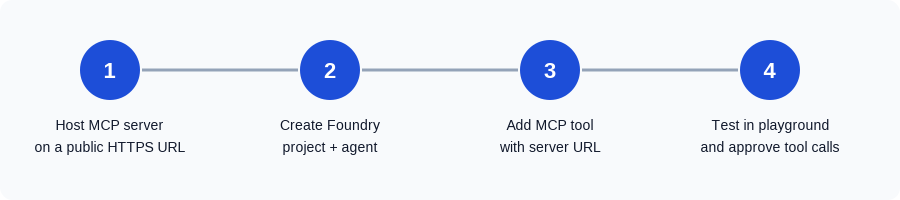
Image could not be loaded.
In the Foundry portal
- Open your Foundry project and create an agent with a deployed model, such as gpt-4o.
- Give the agent clear instructions, for example: "You are an order assistant. Use the tools to answer. Never guess order data."
- Add a tool, choose Model Context Protocol, and paste your server URL, such as https://my-mcp.azurecontainerapps.io/mcp. Give it a label like order_tools.
- Open the playground and ask: "Where is order 1001?"
The agent should call get_order_status, receive the JSON, and reply something like: "Your order 1001 has shipped and is expected on 3 June 2026."
Optional: do it from code
You can also attach the server through the Azure AI Projects SDK. Names can change between SDK versions, so check the official docs linked below.
pip install azure-ai-projects azure-identity

from azure.identity import DefaultAzureCredential
from azure.ai.projects import AIProjectClient
from azure.ai.projects.models import PromptAgentDefinition, MCPTool

project = AIProjectClient(
    endpoint="https://<your-resource>.services.ai.azure.com/api/projects/<your-project>",
    credential=DefaultAzureCredential(),
)

mcp_tool = MCPTool(
    server_label="order_tools",
    server_url="https://my-mcp.azurecontainerapps.io/mcp",
    require_approval="always",
)

agent = project.agents.create_version(
    agent_name="order-assistant",
    definition=PromptAgentDefinition(
        model="gpt-4o",
        instructions="Use the tools to answer order questions. Never guess.",
        tools=[mcp_tool],
    ),
)Lessons learned
- Descriptions matter most. A vague docstring means the model picks the wrong tool.
- Keep tools small. One tool, one clear job.
- Return short, clean data. Large responses waste tokens and confuse answers.
- Handle errors kindly. A readable message lets the AI recover gracefully.
- Validate inputs. The model is smart, but it can still send bad values.
That is the whole journey: a C# API with the logic, a thin Python MCP server that describes it, and a Foundry agent that uses it in natural language. Start with one tool, get it working, then grow from there.